Advanced Setup
1. WHAT DOES “CLONE” MEAN?
Cloning a repo means downloading a copy of the project from GitHub to your own computer or server.
This gives you:
the code
the folder structure
the general files you need to run the bot
2. COPY YOUR GITHUB REPO LINK
Go to the Aurora GitHub repository.
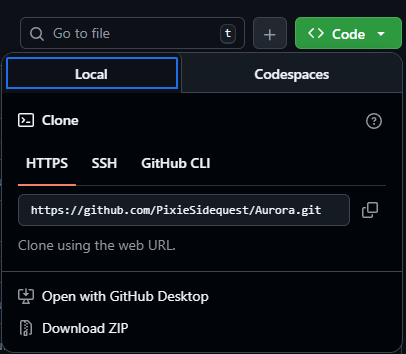
Click the green Code button and copy the HTTPS link.
It will look something like: https://github.com/pixiesidequest/aurora.git
3. Ensure you have selected a file location for aurora to live
Go to the place where you want Aurora to live.
For example, “C:\Bots”
If the folder doesn’t exist yet, create it before moving to the next step.
4. OPEN COMMAND PROMPT OR POWERSHELL to CLONE THE REPOSITORY
Navigate to the bot location terminal using: “cd C:\Bots”
Run: “git clone https://github.com/pixiesidequest/aurora.git”
This will create a new folder named after your repo.
5. CHECK THAT THE FILES DOWNLOADED
You should see files like:
bot.py
requirements.txt
config files
module folders
If you see your project files, the clone worked. LET’S GOOOOOOO (If not, message me)
Quick Recap - what did we do?
Copied the GitHub repo link
Downloaded Aurora to the server
Opened the project locally